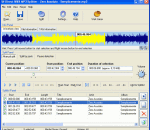
AoA Audio Extractor provides you a handy tool to extract audio/sound or background music from video files. With AoA Audio Extractor, you can easily extract audio tracks from AVI, MPEG, FLV (Flash Video), DAT, WMV, MOV, MP4, 3GP video files and save them as MP3, WAV and AC3 formats.It can also be used to save any portion of the audio of a video file. AoA Audio Extractor is FREE software. You don't need to pay for AoA Audio Extractor.
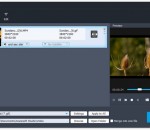
Aiseesoft Burnova is professional DVD creator which can burn DVD disc/folder/ISO file from local or downloaded videos. It supports almost all video formats like MP4, MTS, VOB, HD MPEG4, HD TS, etc. After making DVD, you can play it on any DVD Player without problem. You can also burn movies to Blu-ray-25 and Blu-ray-50, or into Blu-ray folder/ISO file to play on PS3, Sony, LG, Samsung, Philips Blu-ray player.
Audio Amplifier Pro adjusts the volume of your audio file or video file. It also allows you to normalize all files to the maximum volume possible without clipping audio track or adjust all files to average volume level. With only several clicks this simple tool bumps the audio up. It would keep the video track unchanged, and the audio will be adjusted with an increase or decrease in volume.
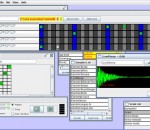
Crescendo Free Music Notation Editing Software is perfect for composing original songs, music, scores, and soundtracks. The program features a wide variety of text, key signatures, time signatures, and notation symbols all on a free-form layout to give you complete control over your music creation. With Crescendo you can compose music for film, a band, a score, or just for fun!
Pianoteq Stage can at any time be upgraded to Pianoteq Standard or Pianoteq PRO to gain further sophisticated features, such as to tweak the physical model, to load Scala temperament files or to position virtual microphones around the instrument. With Pianoteq Stage, you are not locked to a certain product but have the option to upgrade whenever needed.
1. Professional Video Recording - Whether you want to record screen, gameplay or your webcam, GoPlay Editor can help you easily achieve it. 2. Multi-Track Video Editing - Every video, every audio, and every picture has a track that can be edited independently. 3. Gorgeous Video Effects - Exquisite text effects, transition animation, video filters and Hollywood movie tones instantly make your work different. 4. Easily upload to Youtube
Content can be transfered in iPhone/iPad/iPod: 1,Music (Purchased music and Synced music). 2,Video (Purchased video and Synced video). 3,Voice memos. 4,Poscasts. 5,Photos Library. 6,Camera Roll (Photos and Videos taken with iPhone Camera)- Photo Stream (iCloud Photos) . 7, Retrieve deleted Photos from iPod Photo Cache.
Apeaksoft iOS Screen Recorder works very well when you want to record any apps, games on iPhone iPad iPod. You can use it to mirror and record real-time gameplay or make a tutorial video from the iOS device to a larger screen. In addition, it allows you to make educational record assignments and present them wirelessly in class.
Pack with MacX DVD Ripper Pro for Windows and MacX HD Video Converter Pro for Windows, it owns the functions of ripping and backuping all DVD movies to Windows player, iPhone, iPad, Android, Galaxy, HTC, WP8, Surface tab, PSP and other tablets and phones. Meanwhile, it supports converting both regular video and HD video formats, convert MKV to MP4, MKV to WMV, AVCHD to MP4, M2TS to MOV, AVI to FLV, etc with easy operation.
VSDC Video Editor can provide you with a plethora of features that you can rely on to quickly come up with professional-looking videos. However, you first need to thoroughly experiment with each function so as to discover its advantages or drawbacks before using it on a regular basis.
iPod Video Converter Factory Pro 4. It's a real all-in-one video converting tool.You can share the video that made by yourself to your friends. It allows you to edit video with few clicks. Besides, iPod Video Converter Factory Pro 4can convert all common video formats to ail iPod models.In this new version, more human-oriented UI has been designed. The setting parameter are more specific. So users' operation experience will be enhanced.
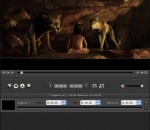
GOM Media Player el reproductor sólo necesita - gratis! No sólo es GOM Media Player un reproductor de vídeo totalmente gratuito, con su soporte incorporado para el vídeo más popular y formatos de Media Player, toneladas de características avanzadas, personalización extrema, y el servicio de buscador de codecs, GOM Media Player es seguro satisfacer todas sus necesidades de reproducción. Con millones de usuarios en cientos de países, GOM Media Player es uno de los reproductores de vídeo más populares del mundo. Cuál es nuevo: Característica añadida "toque"configuración para dispositivos de pantalla táctil. Agregada función "Buscador" en lista de reproducción. (Ctrl + F) Admiten "HTTPS URL" para youtube o reproducción de radio red. (Ctrl + U) Añadido "Música Pulse" preferencias relacionadas a reproducir archivos de música. Mejorar el rendimiento relacionada con la "velocidad de agregar y borrar" archivos en lista de reproducción. Otras diversas correcciones, correcciones y cambios
RealPlayer siempre ha permitido reproducir RealAudio (*. ra) y RealMedia (* .ram) archivos. Descargar vídeos de miles de sitios Web con un solo clic construir su propia biblioteca de vídeos y listas de reproducción jugar todos los principales de audio y formatos de vídeo Flash Video soporte DVD, SVCD, VCD quema y video grabación RealPlayer para uso personal incluye audio CD burning capacidades, búsqueda de almacenamiento en búfer de multimedia de reproducción DVR-estilo, radio por Internet, una biblioteca de archivos de estilo de jukebox, un navegador web incorporado (utilizando Microsoft Internet Explorer)y la capacidad de transferir medios a varios dispositivos portátiles, incluyendo iPod de Apple, reproductores MP3 y dispositivos de Windows Media.
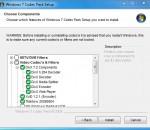
GOM es un reproductor multimedia gratis con audio populares & códecs de vídeo incorporado. Codec Finder GOM Player incluye muchos codecs (XviD, DivX, FLV1, AC3, OGG, MP4, H263 y más) por lo que no necesitará instalar códecs separados para la mayoría de los videos. Para los vídeos que requieren un codec separado, GOM Player se encuentra uno. Jugar permite de tecnología patentada de archivos de AVI rotos (patentado) GOM Player usuarios para ver archivos con índices rotos o que aún están siendo descargados. Soportes de soporte de subtítulos GOM Player potentes SMI, SRT, RT, SUB (con IDX) archivos de subtítulos. Incluso puede sincronizar subtítulos y video si hay alguna coincidencia. Playlist conveniente si se ejecuta un archivo de vídeo y ya existe un archivo con un nombre similar en el directorio, que se añadirán automáticamente a tu lista de reproducción. GOM Player tiene un formato similar de la lista de reproducción M3U, PLS, ASX. Ayuda diferentes tipos de medios de comunicación en formato de diferentes medios de comunicación tales como AVI, MPEG y MPG, DAT, GOM Player también soporta streaming Windows media format (WMV, ASF, ASX). También puedes ver videos de calidad DVD con salida de audio de 5.1 canales.